
Send your fixes back to Rekordbox, safely
You fixed hundreds of keys and built Collections. They are only useful if they get back into Rekordbox, without losing the cue points you spent years setting.
You fixed hundreds of keys and built Collections. They are only useful if they get back into Rekordbox, without losing the cue points you spent years setting.
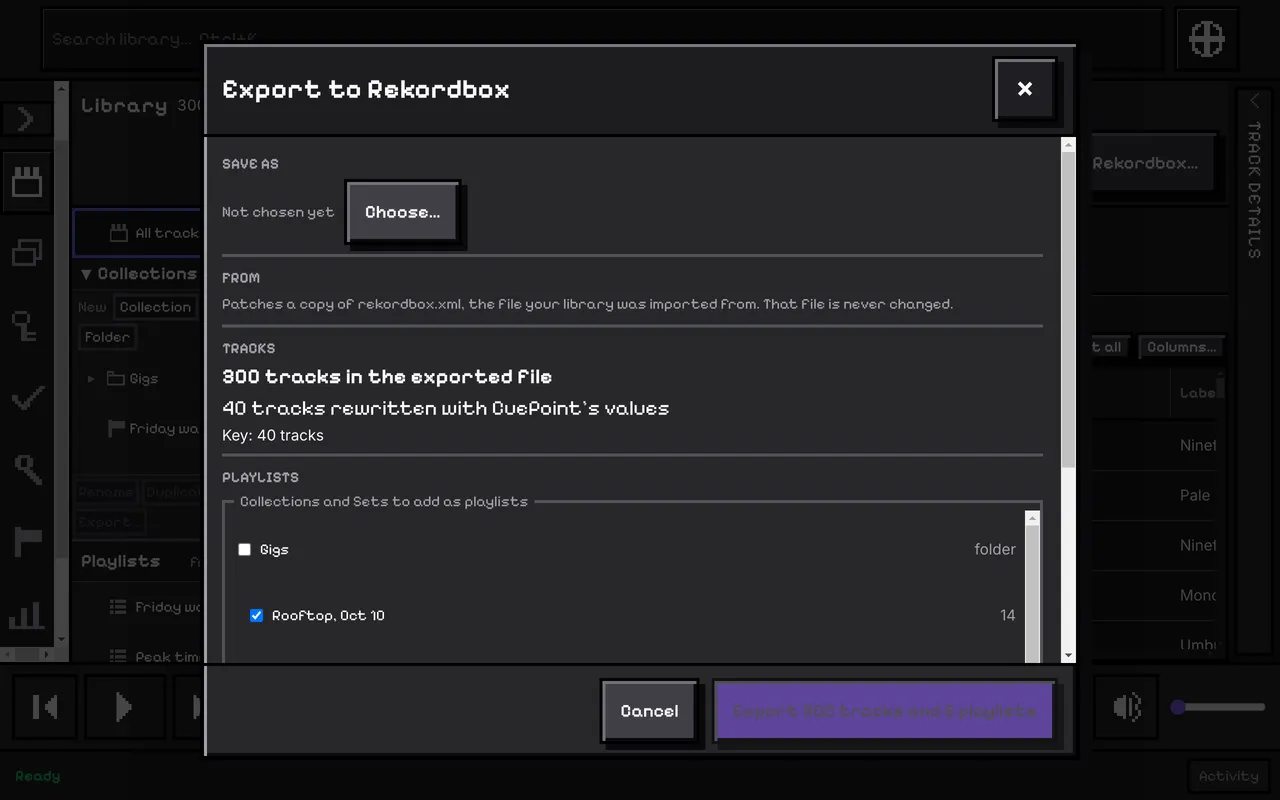
Export takes the XML file you imported, copies it, and changes only the values you changed in CuePoint. Hot cues, memory cues, beat grids and everything else Rekordbox wrote are carried over exactly as they were.
A preview says what will be written before anything is: where the file goes, how many tracks get your values field by field, and each playlist. It also tells you if the file you imported has changed since. The button says what it will do, for example “Export 3,880 tracks and 4 playlists”.
It writes your key, tempo, genre, label, year and rating, and the Collections you tick as playlists in a folder called CuePoint. A Set you tick is one playlist in its running order, at its own folder path.
Rekordbox shows the exported file as a second library, “rekordbox xml”, beside your own. Point Rekordbox at the file in its preferences and drag the playlists or tracks you want into your collection. You can write keys as Rekordbox does, or as Camelot (8A).
The full steps, in the user guide.
Match tracks to Beatport, fix values, find duplicates and missing files.
Search, filters and columns over your whole collection.
Every part, one line each.