
See which keys your playlists hold
Before a gig you want to know what the crate is made of. Is it all 8A and 9A, or is there nothing that fits a 3B opener? Rekordbox does not count keys for you.
Before a gig you want to know what the crate is made of. Is it all 8A and 9A, or is there nothing that fits a 3B opener? Rekordbox does not count keys for you.


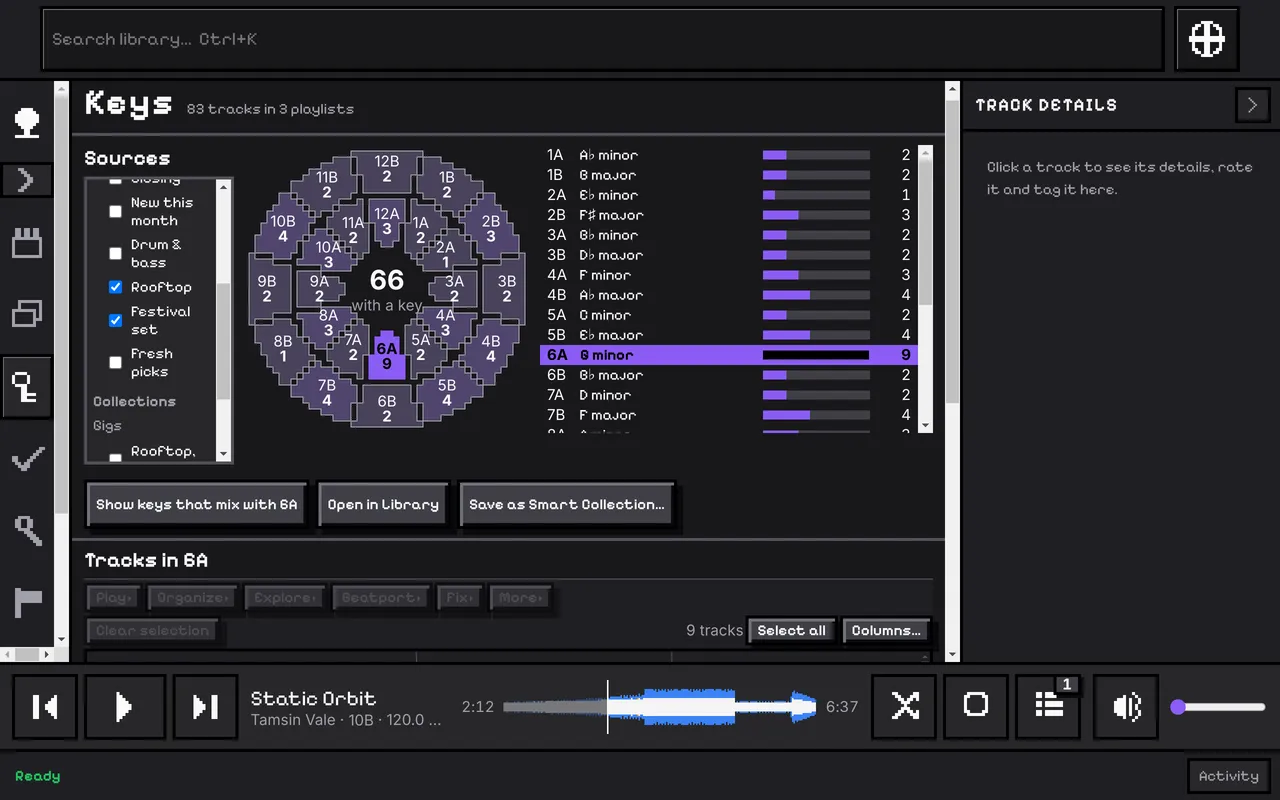
Keys is its own page in the sidebar. Choose the whole library, or tick several playlists, Collections and Sets. CuePoint counts each key over everything you chose and shows the counts on the Camelot wheel, darker where there are more, and as a list in Camelot order. A track in several sources is counted once.
The numbers are written on the page, not only shown when you hover.
Click one or more keys to list those tracks underneath. Ask for the keys that mix with 8A and the wheel lights them. Open the choice in the Library, or save it as a Smart Collection, with the playlists you ticked carried along.
The count uses your own key for a track, or else the key of its accepted Beatport match. Tracks with neither are counted on their own line, “No Beatport key”, so you can see how much of the playlist still needs matching.
The full steps, in the user guide.
Search, filters and columns over your whole collection.
Most played, never played, and how the library spreads.
Every part, one line each.