
Plan your set before you get to the booth
You plan a set in your head, or on a scrap of paper, and find out at the gig that two tracks clash in key or that the warm-up runs twenty minutes long.
You plan a set in your head, or on a scrap of paper, and find out at the gig that two tracks clash in key or that the warm-up runs twenty minutes long.
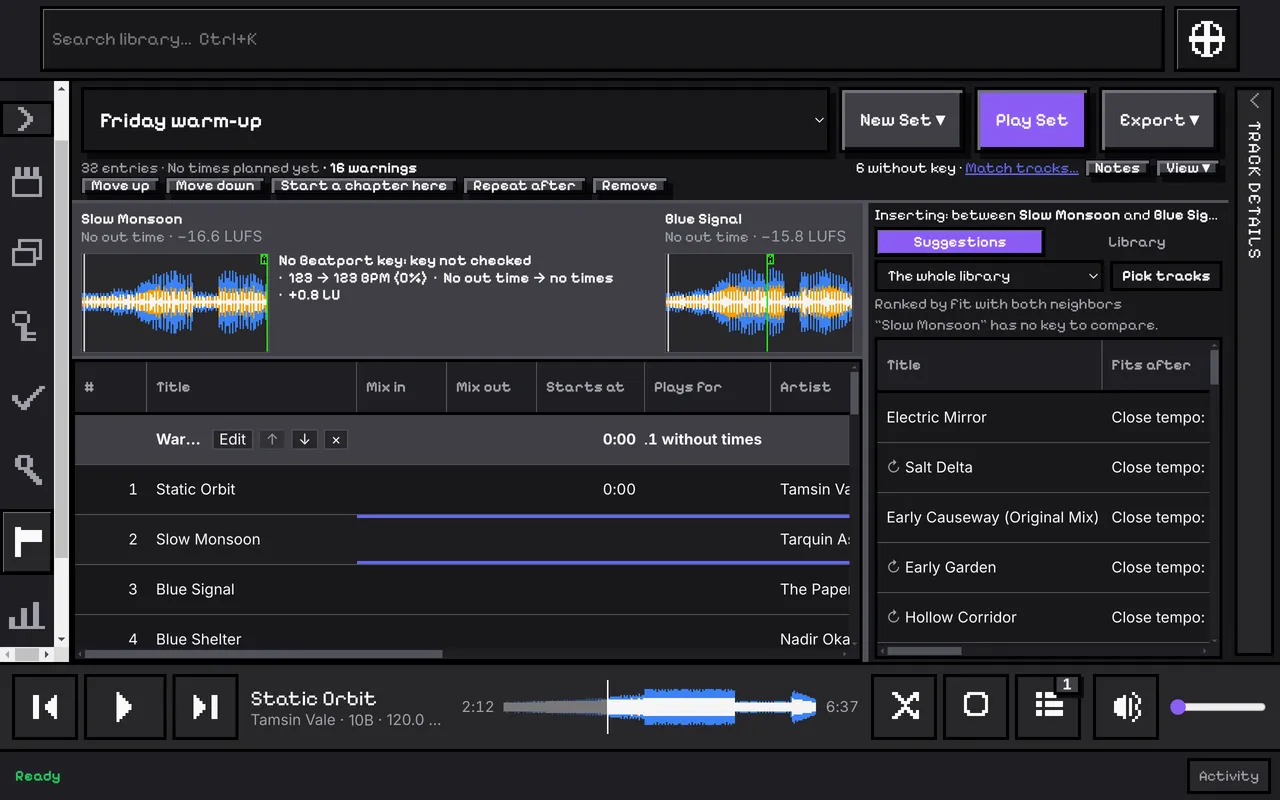
A Set is a running order. Start an empty one, or copy a Collection, a Rekordbox playlist or your selection into one. Divide it into chapters such as warm-up, peak and close, and give a chapter a target length and a BPM range.
Each entry can carry a planned in and out time, so the Set adds up how long it will run. It counts only the entries you timed, and says how many it did not count.
CuePoint checks every transition and says what it finds: a tempo jump outside the window that fits (half and double time count as fitting), a key clash with no relation on the Camelot wheel, or a track with no BPM to compare. It also flags a missing file and a chapter that runs over or under its target.
A warning never stops you. Acknowledge one you have heard and know works.
Choose a gap and CuePoint suggests tracks that fit between the two around it. Play the Set as the queue, then save a set list as text, CSV or M3U8, or export the Set to Rekordbox as one playlist.
The full steps, in the user guide.
Search, filters and columns over your whole collection.
A waveform and a loudness number for every track, and a player to try them.
Every part, one line each.